目的:根据用户选择复制满足一定条件的Excel行到另外一个行中。
注意红色的关键代码。
'把包含某一个数字的记录,
'全部复制到result 工作簿里
'用户选择的range范围
Sub findByNumber()
Dim rng As Range
Dim newrng As Range
Dim Tools As New Toolkit
Dim choice As Integer
Dim cell As Object
Dim rRow As Range
Dim inyes As Boolean
Dim realnumber As Integer
Dim name As String
Dim counter As Integer
inyes = False
On Error Resume Next
counter = 1
choice = Application.InputBox("输入包含的数字", "查找的数字", Type:=1)'必须为数字
Set rng = Application.InputBox("选择数据范围", "选择数据", Selection.Address, , , , , 8)
If rng Is Nothing Then
MsgBox "你没有选择数据,不能继续"
Exit Sub
End If
name = rng.Parent.name
Add_Sheet ("result")
realnumber = choice
Sheets(name).Activate
If realnumber = 0 Then
Else
On Error GoTo errorhandler
For Each rRow In rng.Rows
inyes = False
For Each cell In rRow.Cells
If cell.value = realnumber Then '行中某一列的值同用户输入的值相等,则该行复制到result
inyes = True
rRow.Copy
Sheets("result").Activate
Sheets("result").Cells(counter, 1).Select
Sheets("result").Paste
counter = counter + 1
Sheets(name).Activate
Exit For
End If
Next 'for
Next
End If
Sheets("result").Activate
Exit Sub
errorhandler:
MsgBox Err.Description & Err.Source
End Sub
星期四, 九月 28, 2006
星期二, 九月 26, 2006
Tips:Excel sort by Each Column of Row
1.Excel提供的按照 行 排序的功能,只能根据第一行,第一列来排序。
不能按照每一行第一列来排序。
必须自己编写一个方法来提供这个功能。
'iWhichWay as xlAscending 或 xlDescending,见Excel 2003 VBA 参考手册
Function SortRows(ByVal iWhichWay As Integer, rng As Range)
Dim rRow As Range
Dim parentSheet As String
parentSheet = rng.Parent.Name
Sheets(parentSheet).Activate '可以在任意sheet工作薄里对数据
'xlAscending,xlDescending
For Each rRow In rng.Rows
rRow.Sort Key1:=Range(rRow.Cells(1).Address), Order1:=iWhichWay , _
OrderCustom:=1, MatchCase:=False, Orientation:=xlLeftToRight, _
DataOption1:=xlSortNormal
Next
End Function
不能按照每一行第一列来排序。
必须自己编写一个方法来提供这个功能。
'iWhichWay as xlAscending 或 xlDescending,见Excel 2003 VBA 参考手册
Function SortRows(ByVal iWhichWay As Integer, rng As Range)
Dim rRow As Range
Dim parentSheet As String
parentSheet = rng.Parent.Name
Sheets(parentSheet).Activate '可以在任意sheet工作薄里对数据
'xlAscending,xlDescending
For Each rRow In rng.Rows
rRow.Sort Key1:=Range(rRow.Cells(1).Address), Order1:=iWhichWay , _
OrderCustom:=1, MatchCase:=False, Orientation:=xlLeftToRight, _
DataOption1:=xlSortNormal
Next
End Function


星期六, 九月 23, 2006
tips:excel vba 等待一段时间继续执行
方法 1: 使用空 For...Next 循环
对此方法缺点有是没有直接方法来确定准确的时间, 程序将运行循环量。 时间量取决于计算机的速度。 以下代码运行循环, 不起作用但占用时间。
Sub MyDelayMacro
For iCount = 1 to 1000
Next iCount
End Sub
方法 2: 使用 API 调用来暂停执行 Word
使用一个 API 调用来暂停执行 Word 用于固定的时间量。
Kernel32 包含函数, 暂停用于指定长的时间, 毫秒中指定程序的执行。 要使用函数, 必须首先在它将在其中使用模块的常规声明部分声明它:
Declare Sub Sleep Lib "kernel32" Alias "Sleep" _
(ByVal dwMilliseconds As Long)
使用以下语法来调用 Sleep 函数:
Sub Sleep()
Sleep 1000 'Implements a 1 second delay
End Sub
方法 3: 使用 OnTime 方法
使用 OnTime 方法来设置长的时间以运行其他宏命令之前暂停。 OnTime 方法使用以下语法:
表达式 .OnTime 时, 名称, Tolerance)
由于 名称 名称 参数需要, 运行一个宏的名称, 必须创建两个宏。 第一个宏包含 OnTime 方法调用和其他命令与宏相关。 第二个宏分配时间已过时运行。 第二个宏可以是 " 虚设 " 宏执行什么。
本示例运行名为 15 秒从示例宏 (MyMainMacro) 运行时间为 " MyDelayMacro " 宏。
Sub MyMainMacro()
' Pause for 15 seconds.
Application.OnTime When:=Now + TimeValue("00:00:15"), _
Name:="MyDelayMacro"
End Sub
Public Sub MyDelayMacro()
' Place your delayed macro commands here.
MsgBox "This macro runs after 15 seconds."
End Sub
有关获取与 VisualBasic 帮助 VisualBasicforApplications, 请单击文章编号以查看 Microsoft 知识库中相应:
对此方法缺点有是没有直接方法来确定准确的时间, 程序将运行循环量。 时间量取决于计算机的速度。 以下代码运行循环, 不起作用但占用时间。
Sub MyDelayMacro
For iCount = 1 to 1000
Next iCount
End Sub
方法 2: 使用 API 调用来暂停执行 Word
使用一个 API 调用来暂停执行 Word 用于固定的时间量。
Kernel32 包含函数, 暂停用于指定长的时间, 毫秒中指定程序的执行。 要使用函数, 必须首先在它将在其中使用模块的常规声明部分声明它:
Declare Sub Sleep Lib "kernel32" Alias "Sleep" _
(ByVal dwMilliseconds As Long)
使用以下语法来调用 Sleep 函数:
Sub Sleep()
Sleep 1000 'Implements a 1 second delay
End Sub
方法 3: 使用 OnTime 方法
使用 OnTime 方法来设置长的时间以运行其他宏命令之前暂停。 OnTime 方法使用以下语法:
表达式 .OnTime 时, 名称, Tolerance)
由于 名称 名称 参数需要, 运行一个宏的名称, 必须创建两个宏。 第一个宏包含 OnTime 方法调用和其他命令与宏相关。 第二个宏分配时间已过时运行。 第二个宏可以是 " 虚设 " 宏执行什么。
本示例运行名为 15 秒从示例宏 (MyMainMacro) 运行时间为 " MyDelayMacro " 宏。
Sub MyMainMacro()
' Pause for 15 seconds.
Application.OnTime When:=Now + TimeValue("00:00:15"), _
Name:="MyDelayMacro"
End Sub
Public Sub MyDelayMacro()
' Place your delayed macro commands here.
MsgBox "This macro runs after 15 seconds."
End Sub
有关获取与 VisualBasic 帮助 VisualBasicforApplications, 请单击文章编号以查看 Microsoft 知识库中相应:
星期五, 九月 22, 2006
Tips:Excel添加新的worksheet
1.添加新的worksheet并检查是否存在,如果存在,则清楚里面的所有数据。
Sub Add_Sheet(shtName As String)
Dim wSht As Worksheet
For Each wSht In Worksheets
If wSht.Name = shtName Then
Sheets(shtName).Cells.Clear '清除所有数据
Sheets(shtName).Activate 'focus
Exit Sub
End If
' MsgBox ActiveSheet.Name
Next wSht
Sheets.Add.Name = shtName
Sheets(shtName).Move After:=Sheets(Sheets.Count)
End Sub
Sub Add_Sheet(shtName As String)
Dim wSht As Worksheet
For Each wSht In Worksheets
If wSht.Name = shtName Then
Sheets(shtName).Cells.Clear '清除所有数据
Sheets(shtName).Activate 'focus
Exit Sub
End If
' MsgBox ActiveSheet.Name
Next wSht
Sheets.Add.Name = shtName
Sheets(shtName).Move After:=Sheets(Sheets.Count)
End Sub
星期四, 九月 21, 2006
tips:遍历(Iterator)Excel Range的数据。
方法一:
For i = 1 To rng.row
For j=1 to rng.column
cells(i,j).value=??.
Next
counter = 1
For Each cell In rng
Cells(21, counter).Value = cell.Value
counter = counter + 1
Next
For i = 1 To rng.row
For j=1 to rng.column
cells(i,j).value=??.
Next
counter = 1
For Each cell In rng
Cells(21, counter).Value = cell.Value
counter = counter + 1
Next
星期三, 九月 20, 2006
Excel Developer Tip: Pausing a Macro to Get a User-Selected Range
目的,停止宏运行,然后让用户选择某个范围的数据range
Sub ProblemCode()
Dim oRangeSelected As Range
On Error Resume Next
Set oRangeSelected = Application.InputBox("Please select a range of cells!", _
"SelectARAnge Demo", Selection.Address, , , , , 8)
If oRangeSelected Is Nothing Then
MsgBox "It appears as if you pressed cancel!"
Else
MsgBox "You selected: " & oRangeSelected.Address(external:=True)
End If
End Sub
这里的inpubox可以改变为一个editor,如果标准Excel显示。
星期五, 九月 08, 2006
开源的数学工具包。
1. Scilab http://www.scilab.org/ 最著名的开源数据包,提供很多语言的接口。
http://jscience.org/ 是个提供一些数学方法的 java mathematics library
提供全部数学方法的函数库非常之少。
遗憾。
http://jscience.org/ 是个提供一些数学方法的 java mathematics library
提供全部数学方法的函数库非常之少。
遗憾。
星期二, 八月 29, 2006
Cool Tips:Mathematica Notebook 输出文本控制
Mathematica里的文本输出是Print方法。
在Mathematica里,文本的被抽象为text和Form.
标准的对象构造方法为:Text.
Show[Graphics[Text["hi",{10,10}]]]

可以控制字体各种属性的构造方法为: StyleForm
StyleForm["2005 Year",
FontSize -> 24, FontWeight -> "Bold", FontColor ->
RGBColor[1, 0, 0],Background->GrayLevel]];
输出大字:2005 Year
StyleForm是最常用的用来控制艺术文字输出的。
但有时侯需要输出格式化的数学公式之类的,就需要用其他的Form
StyleForm的标准构造如下。
StyleForm[expr, options]
其中expr可以接受表达式的输入。
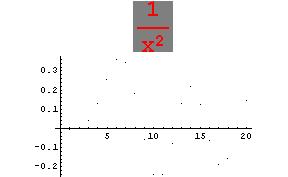
比如输出一个数学公式,需要用M的函数StandForm来格式化。
values=BesselJ[5,Range[20]];
ListPlot[values, PlotLabel -> StyleForm[StandardForm[1/x^2],
FontSize -> 24, FontWeight -> "Bold", FontColor -> RGBColor[
1, 0, 0], Background -> GrayLevel[0.5]]]
得到如图:

Graphics有两个Hook方法.Prolog和Epilog分别是在绘画主图前和后调用来产生图形同主图形
透视的函数。
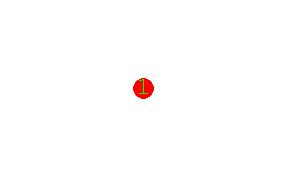
比如想在一个圆点内写上字,就应该如下:
Show[Graphics[{{PointSize[.075], RGBColor[1, 0, 0], Point[{0, 0}]}}], Epilog -> Text["1", {0, 0}, TextStyle -> {FontSize -> 24, FontStyle -> "BOLD", FontColor -> RGBColor[0, 1, 0]}]];
在Mathematica里,文本的被抽象为text和Form.
标准的对象构造方法为:Text.
Show[Graphics[Text["hi",{10,10}]]]

可以控制字体各种属性的构造方法为: StyleForm
StyleForm["2005 Year",
FontSize -> 24, FontWeight -> "Bold", FontColor ->
RGBColor[1, 0, 0],Background->GrayLevel]];
输出大字:2005 Year
StyleForm是最常用的用来控制艺术文字输出的。
但有时侯需要输出格式化的数学公式之类的,就需要用其他的Form
StyleForm的标准构造如下。
StyleForm[expr, options]
其中expr可以接受表达式的输入。
比如输出一个数学公式,需要用M的函数StandForm来格式化。
values=BesselJ[5,Range[20]];
ListPlot[values, PlotLabel -> StyleForm[StandardForm[1/x^2],
FontSize -> 24, FontWeight -> "Bold", FontColor -> RGBColor[
1, 0, 0], Background -> GrayLevel[0.5]]]
得到如图:
Graphics有两个Hook方法.Prolog和Epilog分别是在绘画主图前和后调用来产生图形同主图形
透视的函数。
比如想在一个圆点内写上字,就应该如下:
Show[Graphics[{{PointSize[.075], RGBColor[1, 0, 0], Point[{0, 0}]}}], Epilog -> Text["1", {0, 0}, TextStyle -> {FontSize -> 24, FontStyle -> "BOLD", FontColor -> RGBColor[0, 1, 0]}]];

星期一, 八月 28, 2006
Mathimatica 里notebook的环境问题。
为了解决插值问题,简单几个语句,竟然无法得出正确的结果:
data={7,2,3,25,1,10};
f = InterpolatingPolynomial[data, x];
f
f /. x -> 5
得到一个很奇怪的结果。如图。

经过在组里询问:mathgroup@smc.vnet.net 和GroupGroup.
http://groups.google.com/group/comp.soft-sys.math.mathematica
得到BOB及其他答案,认为是Mathemathica 的kernel不"干净"需要重新启动Mathematica 再看看。
最终。使用bob的方法。
:
data={7,2,3,25,1,10};
Clear[f];
f[x_]=InterpolatingPolynomial[data,x];
f[5]
终于得到正确的答案1
而且最近 被Mathematica的变量的范围问题(Variable Scope)弄的头大,
根据手册,Module和Block申明的变量应该是在外面不可见的。
但输入函数中的变量依然可以被看见,这就导致了,循环调用函数的时候,外部的
For 循环计数器同函数内部的变量冲突了。
Damned
data={7,2,3,25,1,10};
f = InterpolatingPolynomial[data, x];
f
f /. x -> 5
得到一个很奇怪的结果。如图。

经过在组里询问:mathgroup@smc.vnet.net 和GroupGroup.
http://groups.google.com/group/comp.soft-sys.math.mathematica
得到BOB及其他答案,认为是Mathemathica 的kernel不"干净"需要重新启动Mathematica 再看看。
最终。使用bob的方法。
:
data={7,2,3,25,1,10};
Clear[f];
f[x_]=InterpolatingPolynomial[data,x];
f[5]
终于得到正确的答案1
而且最近 被Mathematica的变量的范围问题(Variable Scope)弄的头大,
根据手册,Module和Block申明的变量应该是在外面不可见的。
但输入函数中的变量依然可以被看见,这就导致了,循环调用函数的时候,外部的
For 循环计数器同函数内部的变量冲突了。
Damned
星期六, 八月 26, 2006
Sun有发布两个新的服务网站,很不错
Javascript Development Center.
http://java.sun.com/javascript/
Development Services
http://developers.sun.com/services/
http://java.sun.com/javascript/
Development Services
http://developers.sun.com/services/
星期五, 八月 25, 2006
如何显示点图和连线图,在Mathematica 5
data = Import["E:/ebook/彩票数据/2006兰色球.txt", "TABLE"];
g1 = ListPlot[data, ImageSize -> {640,
480}, AxesLabel -> {"序号", "兰色球"}, PlotStyle -> {
PointSize[.04], RGBColor[1, 0, 0]}, PlotJoined -> True,
AxesOrigin -> {0, 0}](*好的*);
g2 = ListPlot[data, ImageSize -> {640,
480}, AxesLabel -> {"序号", "兰色球"}, PlotStyle -> {
PointSize[.04], RGBColor[1, 0, 0]}, PlotJoined -> False,
AxesOrigin -> {0, 0}](*好的*);
Show[g1,g2];
g1 = ListPlot[data, ImageSize -> {640,
480}, AxesLabel -> {"序号", "兰色球"}, PlotStyle -> {
PointSize[.04], RGBColor[1, 0, 0]}, PlotJoined -> True,
AxesOrigin -> {0, 0}](*好的*);
g2 = ListPlot[data, ImageSize -> {640,
480}, AxesLabel -> {"序号", "兰色球"}, PlotStyle -> {
PointSize[.04], RGBColor[1, 0, 0]}, PlotJoined -> False,
AxesOrigin -> {0, 0}](*好的*);
Show[g1,g2];
星期四, 八月 24, 2006
Mathematica 中的插值(Interpolation)函数及使用
Mathematica 支持所有的数学插值概念,比如拉格朗日(lagrange) 插值,牛顿(newTon)插值.
及其他插值方法。
各种插值方法:http://mathworld.wolfram.com/Interpolation.html
参考数值积分:http://mathworld.wolfram.com/NumericalIntegration.html
使用拉格朗日(lagrange) 插值的函数为InterpolatingPolynomial
参考: http://mathworld.wolfram.com/LagrangeInterpolatingPolynomial.html
最后的结果用Newton-Cotes formula 牛顿-科茨公式形式。
NewTon插值没有实现可以参看一个实现:
http://math.fullerton.edu/mathews/n2003/NewtonPolyMod.html
或这里:http://mathworld.wolfram.com/NewtonsDividedDifferenceInterpolationFormula.html
f = Interpolation[lsdata[[All, {3, 4, 5, 6, 7, 8, 9}]][[1]]]
f[4]
NumericalMath`PolynomialFit`
InterpolatingPolynomial[lsdata[[All, {3, 4, 5, 6, 7, 8}]][[1]], x]
N[f /. x -> 3]
(*freeze lock*)
InterpolatingPolynomial[lsdata[[All, {3, 4}]], x]
(*dead*)
及其他插值方法。
各种插值方法:http://mathworld.wolfram.com/Interpolation.html
参考数值积分:http://mathworld.wolfram.com/NumericalIntegration.html
使用拉格朗日(lagrange) 插值的函数为InterpolatingPolynomial
参考: http://mathworld.wolfram.com/LagrangeInterpolatingPolynomial.html
最后的结果用Newton-Cotes formula 牛顿-科茨公式形式。
NewTon插值没有实现可以参看一个实现:
http://math.fullerton.edu/mathews/n2003/NewtonPolyMod.html
或这里:http://mathworld.wolfram.com/NewtonsDividedDifferenceInterpolationFormula.html
f = Interpolation[lsdata[[All, {3, 4, 5, 6, 7, 8, 9}]][[1]]]
f[4]
NumericalMath`PolynomialFit`
InterpolatingPolynomial[lsdata[[All, {3, 4, 5, 6, 7, 8}]][[1]], x]
N[f /. x -> 3]
(*freeze lock*)
InterpolatingPolynomial[lsdata[[All, {3, 4}]], x]
(*dead*)
星期一, 八月 21, 2006
Mathematica 图形IO接口
打开一个文件选择:
两种方法:
4.0之后,Mathematica 提供函数包 <
选择文件后,返回选择的文件完全路径
比如打开一个Access数据库,需要用户选择文件所在目录
Needs["DatabaseLink`"]
(*DatabaseExplorer[]*)
conn= OpenSQLConnection[JDBC["sun.jdbc.odbc.JdbcOdbcDriver", "jdbc:odbc:Driver={Microsoft Access Driver (*.mdb)};DBQ="<>Experimental`FileBrowse[]], "Name" -> "test",
"Description" -> "", "Username" -> "root", "Password" -> "",
"RelativePath" -> False, "Version" -> 1]
二,使用Java来编写一个跨平台的FileChooser
Needs["JLink`"]
FileChooserDialog[] := FileChooserDialog["Select a file:", "Open", Directory[]]
FileChooserDialog[title_String, okText_String, dir_String] :=
JavaBlock[
Module[{dlg, chosenFile, result = Null},
InstallJava[];
dlg = JavaNew["javax.swing.JFileChooser"];
dlg@setCurrentDirectory[JavaNew["java.io.File", dir]];
dlg@setDialogTitle[title];
If[dlg@showDialog[Null, okText] === JFileChooser`APPROVEUOPTION,
chosenFile = dlg@getSelectedFile[];
If[chosenFile =!= Null,
result = chosenFile@getPath[]
]
];
result
]
]
In[1]:=FileChooserDialog[]
返回选择文件路径。
两种方法:
4.0之后,Mathematica 提供函数包 <
选择文件后,返回选择的文件完全路径
比如打开一个Access数据库,需要用户选择文件所在目录
Needs["DatabaseLink`"]
(*DatabaseExplorer[]*)
conn= OpenSQLConnection[JDBC["sun.jdbc.odbc.JdbcOdbcDriver", "jdbc:odbc:Driver={Microsoft Access Driver (*.mdb)};DBQ="<>Experimental`FileBrowse[]], "Name" -> "test",
"Description" -> "", "Username" -> "root", "Password" -> "",
"RelativePath" -> False, "Version" -> 1]
二,使用Java来编写一个跨平台的FileChooser
Needs["JLink`"]
FileChooserDialog[] := FileChooserDialog["Select a file:", "Open", Directory[]]
FileChooserDialog[title_String, okText_String, dir_String] :=
JavaBlock[
Module[{dlg, chosenFile, result = Null},
InstallJava[];
dlg = JavaNew["javax.swing.JFileChooser"];
dlg@setCurrentDirectory[JavaNew["java.io.File", dir]];
dlg@setDialogTitle[title];
If[dlg@showDialog[Null, okText] === JFileChooser`APPROVEUOPTION,
chosenFile = dlg@getSelectedFile[];
If[chosenFile =!= Null,
result = chosenFile@getPath[]
]
];
result
]
]
In[1]:=FileChooserDialog[]
返回选择文件路径。
星期六, 八月 19, 2006
Mathematica 有关微积分的函数包
Calculus`VariationalMethods`
里面包括Euler(?Lagrange) 方程的应用。
看到这里。我想得出 数学模型的建立和 数论之间的关系。
由此得出了,要想把模型建立的纯熟,<<数值分析>>Numerical Analysis的教材是必须要学习的。
所以 下载了一些教材。这里是老外的教材下载.
http://william.wang.googlepages.com/Numerical Analysis.rar
里面包括Euler(?Lagrange) 方程的应用。
看到这里。我想得出 数学模型的建立和 数论之间的关系。
由此得出了,要想把模型建立的纯熟,<<数值分析>>Numerical Analysis的教材是必须要学习的。
所以 下载了一些教材。这里是老外的教材下载.
http://william.wang.googlepages.com/Numerical Analysis.rar
星期一, 八月 14, 2006
金山词霸 2005 XP 不能取词原因
必须保证XP的服务:
DCOM 服务器进程启动器
已经启动。
第二可能同数据执行保护(DEP)有关
微软提供的新功能??数据执行保护(DEP)惹的祸,要出现这个问题,需要满足以下两个条件:
1、系统支持数据执行保护(DEP)功能,目前知道2003sp1支持,估计XP sp2也支持
2、CPU支持硬件DEP,我的AMD Athlon64 2800+就有这个问题,而Athlon 1600+没有,单位的P4 2.66也没有。
(得到的结论就是:Athlon64支持硬件DEP。不支持硬件DEP的在设定DEP的界面有提示,说只能执行软件DEP云云。再给我偏爱的AMD做一次广告!)
解决办法:
我的电脑(鼠标右键)??〉属性??〉高级??〉性能(设置)??〉数据执行保护??〉添加金山词霸的主文件
需要重启系统才能生效
DCOM 服务器进程启动器
已经启动。
第二可能同数据执行保护(DEP)有关
微软提供的新功能??数据执行保护(DEP)惹的祸,要出现这个问题,需要满足以下两个条件:
1、系统支持数据执行保护(DEP)功能,目前知道2003sp1支持,估计XP sp2也支持
2、CPU支持硬件DEP,我的AMD Athlon64 2800+就有这个问题,而Athlon 1600+没有,单位的P4 2.66也没有。
(得到的结论就是:Athlon64支持硬件DEP。不支持硬件DEP的在设定DEP的界面有提示,说只能执行软件DEP云云。再给我偏爱的AMD做一次广告!)
解决办法:
我的电脑(鼠标右键)??〉属性??〉高级??〉性能(设置)??〉数据执行保护??〉添加金山词霸的主文件
需要重启系统才能生效
星期六, 八月 12, 2006
Mathematica 数据类型转换
如何把一个数字字符串,转换为数字?
方法:
使用ToExpression [expr]
比如:"33",使用
b=ToExpression["33"]
Head@b执行后得到:
Integer
非常隐秘的方法。
方法:
使用ToExpression [expr]
比如:"33",使用
b=ToExpression["33"]
Head@b执行后得到:
Integer
非常隐秘的方法。
星期五, 八月 11, 2006
Mathematica 中的数据类型判断
如何判断一个变量的数据类型?
两种方法。
1.用Head方法
Head@变量名字.
如同Java InstanceOf,
2.用Q族方法。
NumberQ
NumericQ
IntegerQ
EvenQ
OddQ
PrimeQ;
ArrayQ
VectorQ
MatrixQ (for these there are nice element tests too)
PolynomialQ (element tests). There are built in "structural" tests
SameQ
UnsameQ
OrderedQ
MemberQ
FreeQ
MatchQ
ValueQ
AtomQ
两种方法。
1.用Head方法
Head@变量名字.
如同Java InstanceOf,
2.用Q族方法。
NumberQ
NumericQ
IntegerQ
EvenQ
OddQ
PrimeQ;
ArrayQ
VectorQ
MatrixQ (for these there are nice element tests too)
PolynomialQ (element tests). There are built in "structural" tests
SameQ
UnsameQ
OrderedQ
MemberQ
FreeQ
MatchQ
ValueQ
AtomQ
星期四, 八月 10, 2006
Mathematica 快速访问 MS Access数据库
(*注意红色URL写法*)
Needs["DatabaseLink`"]
(*DatabaseExplorer[]*)
conn= OpenSQLConnection[JDBC["sun.jdbc.odbc.JdbcOdbcDriver", "jdbc:odbc:Driver={Microsoft Access Driver (*.mdb)};DBQ=D:\lottery\history.mdb"], "Name" -> "test",
"Description" -> "", "Username" -> "root", "Password" -> "",
"RelativePath" -> False, "Version" -> 1]
Needs["DatabaseLink`"]
(*DatabaseExplorer[]*)
conn= OpenSQLConnection[JDBC["sun.jdbc.odbc.JdbcOdbcDriver", "jdbc:odbc:Driver={Microsoft Access Driver (*.mdb)};DBQ=D:\lottery\history.mdb"], "Name" -> "test",
"Description" -> "", "Username" -> "root", "Password" -> "",
"RelativePath" -> False, "Version" -> 1]
星期五, 八月 04, 2006
Mathematica 一些表达式语法
1.单值函数调用 用 @ 符号
2.字符串连接用<> 符号. "ddd"<>"bbb" 得到 dddbbb
3.函数返回值。 最后一个表达式的结果 默认为函数的结果。
2.字符串连接用<> 符号. "ddd"<>"bbb" 得到 dddbbb
3.函数返回值。 最后一个表达式的结果 默认为函数的结果。
星期三, 七月 26, 2006
Mathematica 中如何使用数据库?
http://documents.wolfram.com/mathematica/Add-onsLinks/DatabaseLink/
Needs["DatabaseLink`"]
DatabaseExplorer[]
1.如何把数据库的JDBC的驱动加入?
把JDBC的jar文件复制到Mathematica DataBaseResource 属性location 指定的目录下。如图

2.这样就可以建立了DatabaseResource资源了,然后就可以在notebook程序中使用了。
使用语法,如果熟悉ODBC或JDBC就非常容易理解了。
Needs["DatabaseLink`"]
(*DatabaseExplorer[]*)
conn= OpenSQLConnection[JDBC["org.gjt.mm.mysql.Driver", "jdbc:mysql://10.2.5.240:3306/HK_PCD55"], "Name" -> "test",
"Description" -> "", "Username" -> "root", "Password" -> "",
"RelativePath" -> False, "Version" -> 1]
(*建立连接,也可以通过配置文件的方式来设置,可参看具体的http://documents.wolfram.com/mathematica/Add-onsLinks/DatabaseLink/DatabaseConnections/EstablishingAConnection/DatabaseLink2.2.1.html*)
SQLSelect[conn,"att_L_LeaveType"]
SQLExecute[conn,"select * from att_L_LeaveType"]
CloseSQLConnection[conn]
可以通过:JDBCDriverNames[] 来得到当前Mathematica内所有的配置数据库
得到某个具体的数据源的具体配置通过命令: JDBCDrivers["mysql"]
Needs["DatabaseLink`"]
DatabaseExplorer[]
1.如何把数据库的JDBC的驱动加入?
把JDBC的jar文件复制到Mathematica DataBaseResource 属性location 指定的目录下。如图

2.这样就可以建立了DatabaseResource资源了,然后就可以在notebook程序中使用了。
使用语法,如果熟悉ODBC或JDBC就非常容易理解了。
Needs["DatabaseLink`"]
(*DatabaseExplorer[]*)
conn= OpenSQLConnection[JDBC["org.gjt.mm.mysql.Driver", "jdbc:mysql://10.2.5.240:3306/HK_PCD55"], "Name" -> "test",
"Description" -> "", "Username" -> "root", "Password" -> "",
"RelativePath" -> False, "Version" -> 1]
(*建立连接,也可以通过配置文件的方式来设置,可参看具体的http://documents.wolfram.com/mathematica/Add-onsLinks/DatabaseLink/DatabaseConnections/EstablishingAConnection/DatabaseLink2.2.1.html*)
SQLSelect[conn,"att_L_LeaveType"]
SQLExecute[conn,"select * from att_L_LeaveType"]
CloseSQLConnection[conn]
可以通过:JDBCDriverNames[] 来得到当前Mathematica内所有的配置数据库
得到某个具体的数据源的具体配置通过命令: JDBCDrivers["mysql"]
订阅:
博文 (Atom)